

Financial Tags in Dynamics 365 SCM 10.0.49: More Transparency in Procurement
Financial Tags in Dynamics 365 SCM 10.0.49: More Transparency in Procurement
Procurement decisions often generate valuable contextual information that is only partially visible in traditional purchasing documents. With version 10.0.49, Microsoft introduces the ability to use Financial Tags in procurement documents. This enables organizations to integrate additional business-related information directly into the procurement process and specifically classify procurement transactions for reporting, analytics, and controlling purposes.
The stored information can be maintained at both the document header and line level and is automatically carried forward throughout the process flow. As a result, relevant classifications can be preserved, for example, from a purchase requisition through a purchase order and into downstream processes. This improves transparency and facilitates the tracking of the business context and purpose behind a procurement transaction.
Why Additional Reporting Context Matters
Accounts and financial dimensions represent the financial structure of a transaction. However, operational analyses often require additional information, such as an initiative, an event, a business purpose, or an internal business objective. When such information is maintained only in descriptions, emails, or separate lists, it becomes difficult to analyze and evaluate it consistently.
Financial Tags provide up to 20 user-defined fields for this purpose. The values are stored on the related accounting entries and provide additional context for reporting and analytics. Microsoft explicitly describes Financial Tags as a way to capture information that does not necessarily need to be maintained as reusable master data or financial dimensions.

System Requirements
To use Financial Tags in procurement documents, the following prerequisites should be met:
- Microsoft Dynamics 365 Supply Chain Management 10.0.49 or later.
- The Enable financial tags for purchase order invoicing feature is enabled in Feature management.
- The required Financial Tags have been configured under General ledger > Chart of accounts > Financial tags > Financial tags.
- Responsible users have the necessary permissions for setup, document maintenance, and reporting.
- Tag names, value types, allowed values, and ownership responsibilities have been defined and agreed upon by the business.
The transfer of Financial Tags between procurement documents and the related posting processes has been validated in a sandbox environment.
Supported Procurement Documents
Financial Tags can be used in various documents throughout the procurement process. Microsoft supports the functionality in, among others:
- Purchase requisitions
- Purchase orders
- Purchase agreements
- Requests for quotation (RFQs)
- Inventory ownership change journals
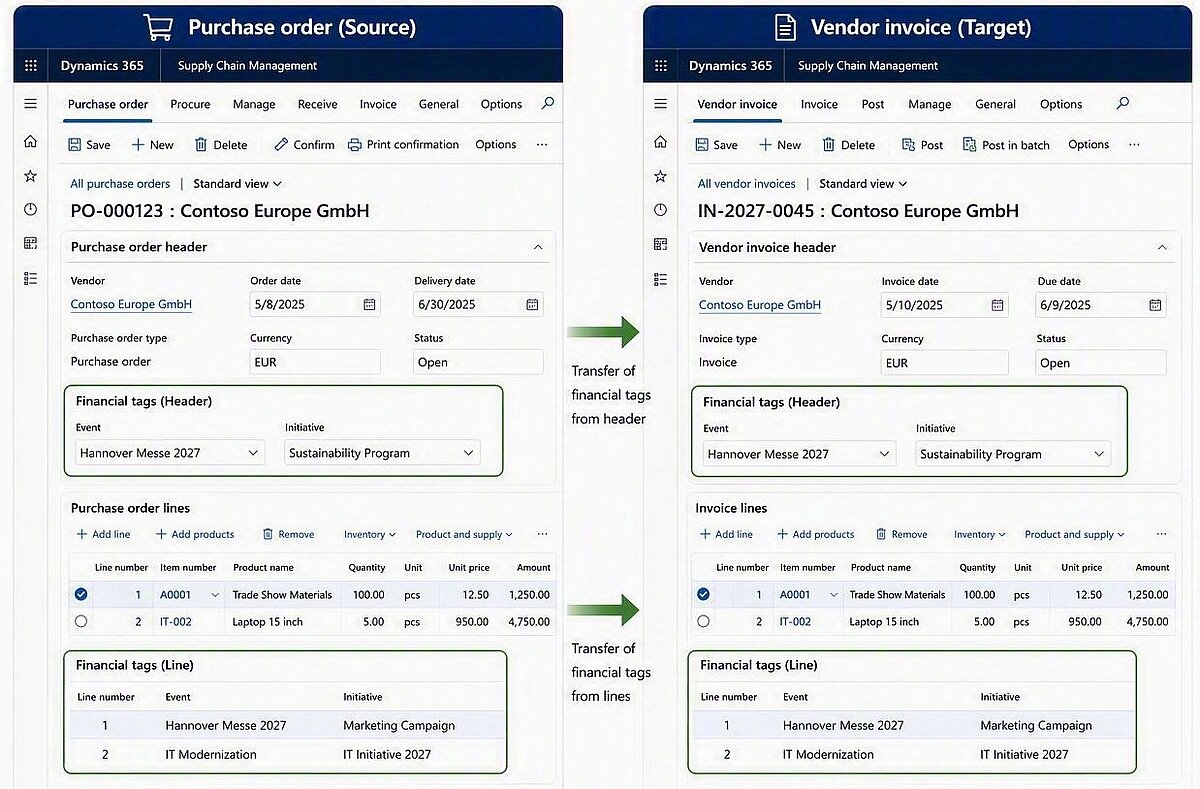
This makes it possible to capture additional reporting context early in the procurement process and retain it across multiple document stages. When a source document creates a subsequent document, the values can be transferred to the corresponding target lines. As a result, the business context remains traceable even throughout multi-step procurement processes.
Maintenance and Transfer Logic in the Procurement Process
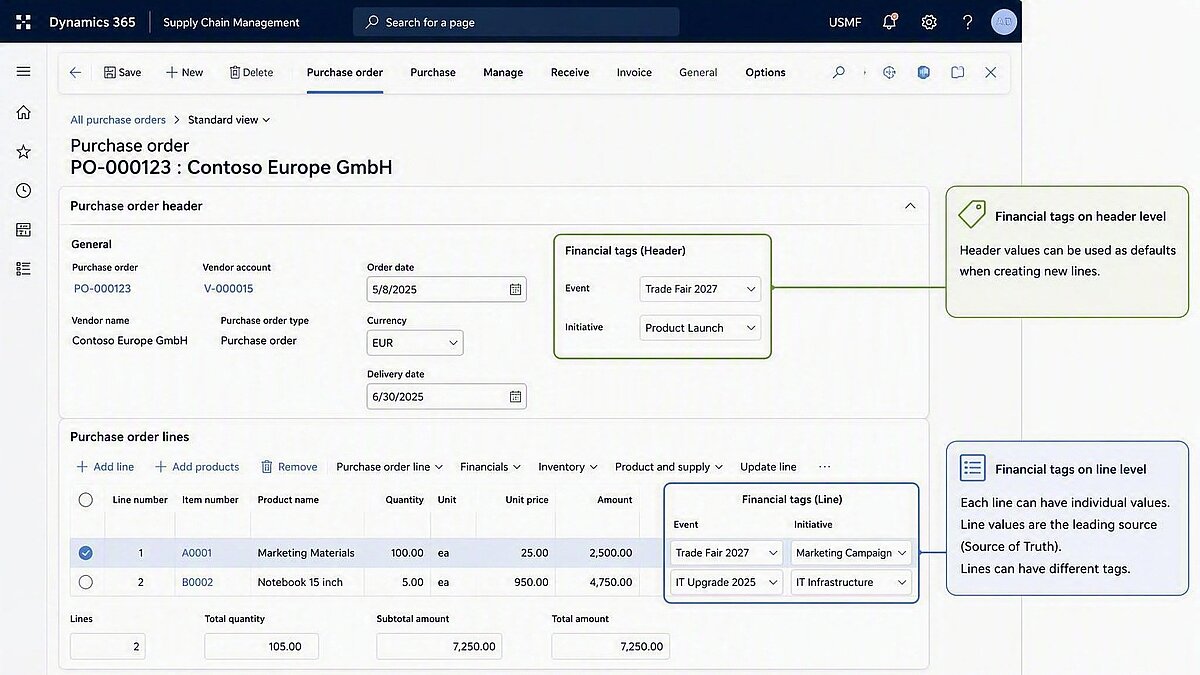
In addition to supporting various procurement documents, Microsoft provides a consistent logic for maintaining and transferring Financial Tags. The information can be entered both at the document header level and on individual lines, with line values serving as the primary source of truth. Populated header values can be used as default values when creating new lines without unintentionally overwriting existing line values. Different values on individual lines allow separate business classifications within the same document. When subsequent documents are created, Financial Tags are generally transferred from the source line to the target line. Documents that have already been created retain the values that were transferred at the time of their creation, which is why Financial Tags should be maintained as early and as accurately as possible. In this way, the feature improves transparency, traceability, and data quality throughout the Procure-to-Pay process.
Distinction from Financial Dimensions
Financial Tags and Financial Dimensions serve different purposes. Financial Dimensions are reusable, structured attributes used for accounting, balances, and multidimensional financial reporting. Financial Tags, on the other hand, enrich accounting entries with additional transaction-specific context that does not necessarily need to be maintained as a permanent dimension within the chart of accounts structure. Therefore, the decision regarding which information should be represented in which structure should be made jointly by Finance, Procurement, and Reporting stakeholders.
Information should not be configured as a Financial Tag simply because the setup appears easier in the short term. If the information is required for accounting rules, budgeting, consolidation, or recurring dimensional reporting, a Financial Dimension may still be the more appropriate choice. Financial Tags are particularly suitable for supplementary attributes where the focus is on the context of an individual transaction rather than on long-term financial structuring.
What changes in day-to-day operations?
- Consistent reporting context across multiple procurement documents.
- Improved traceability of the business purpose behind an expenditure.
- More flexible analysis of additional information stored on accounting entries.
- Reduced reliance on free-text descriptions, emails, and manually maintained spreadsheets.
- Granular assignment of individual document lines to different initiatives, projects, or business events.
- More targeted use of Financial Dimensions, as supplementary reporting attributes can be captured through Financial Tags.
Approach for a successful rollout
The implementation of Financial Tags should begin with a clearly defined reporting concept. For each planned tag, the purpose, value type, permitted values, responsible role, and required reporting scenarios should be documented. A pilot process involving Purchase Requisitions, Purchase Orders, and Vendor Invoices is recommended as a starting point. Test scenarios should include both single-line documents and documents with multiple lines containing different tag values.
In addition, data quality and governance aspects should be taken into consideration. Freely entered values may result in inconsistent naming conventions, while controlled value lists require additional maintenance effort. Training materials should clearly explain the leading role of line values, the defaulting behavior from the header, and the transfer of values from the source line to the target line. Before going live, reporting, security permissions, and potential impacts on integrations or data export processes should also be thoroughly tested.
Additional Information
Optimize Your Supply Chain with Dynamics 365
Want to make your procurement and supply chain processes more transparent, connected, and efficient? Discover how Dynamity supports businesses with Microsoft Dynamics 365 Supply Chain Management or talk to us about your specific requirements.