

D365 Units of measure for line-level charges
Microsoft Dynamics 365 Finance and Operations help companies with many different finance counts, where every detail is very important for adaptation to real-word business requirements. One such element is how charges are applied at the line level. The new improvement, new feature Units of measure for line-level charges allows business to define units of measure for charges at the line level, enabling more precise cost calculation and greater substantial flexibility in pricing.
This feature is especially useful for businesses with complex pricing structures, such as logistics, manufacturing, or wholesale.
Prerequisites
- Microsoft Dynamics 365 Supply Chain Management version 10.0.38 or later.
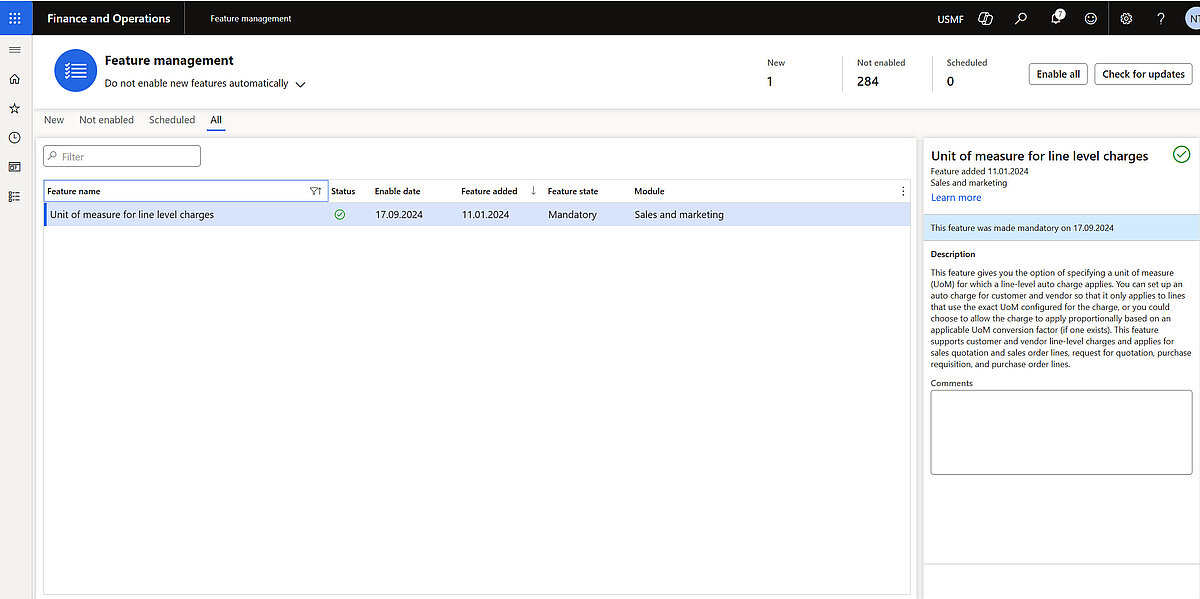
- The feature that's named Unit of measure for line level charges must be turned on in Feature management.
- As of version 10.0.45, the feature is mandatory and cannot be turned off.
What’s New?
In earlier versions of Dynamics 365, line-level charges—such as handling fees, container surcharges, or environmental taxes—were typically calculated using fixed amounts or percentage-based values. However, businesses that operate with bulk, volume, or per-unit pricing models require more granular control.
A Unit of Measure (UOM) in Dynamics 365 specifies how product or service quantities are represented and managed—whether for tracking, selling, purchasing, or storing. This concept is fundamental across key modules, including Finance and Operations, Sales, Commerce, and Supply Chain.
This enhancement allows users to apply charges based on a specific UOM, such as:
- Per piece
- Per weight unit (kg, lb)
- Per volume unit (m³)
By introducing UOM-based charges, businesses gain a more dynamic, scalable approach that aligns with real-world logistics and procurement costs.
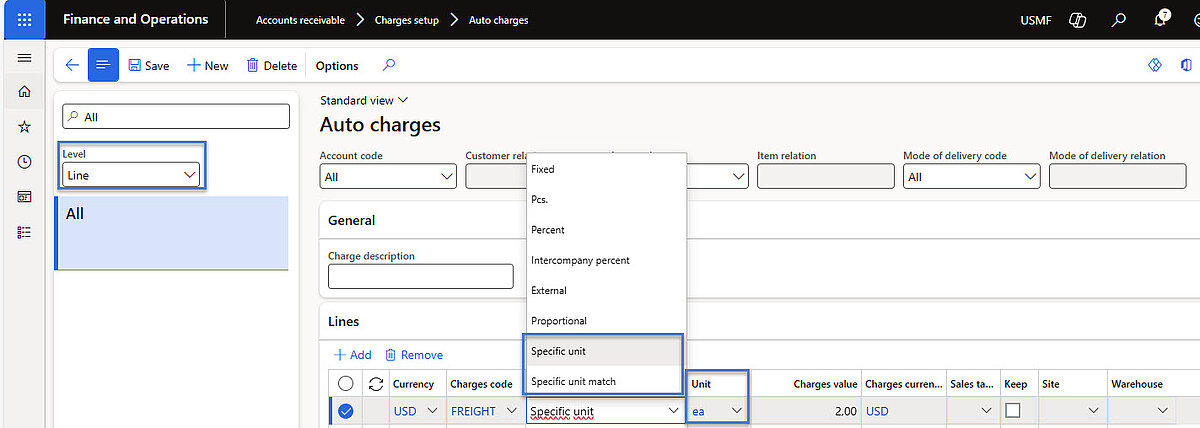
All line-level automatic charges and line charges include a category that determines how and where the charge is applied. The available categories are Specific unit and Specific unit match. These categories allow you to configure and apply charges based on the unit of measure for a sold or purchased line item.
Every line-level automatic charge and line charge includes a category that specifies how and where the charge is applied. The two available categories — Specific unit and Specific unit match — make it possible to configure charges based on the unit of measure for a sold or purchased line item. Their functionality is as follows:
- Specific unit – Charges are based on a designated unit of measure, such as ea. When conversion factors are available, the system adjusts the calculation for different units.
Example: For an sales order of 3 boxes of an item (5 ea per box) with a charge rate of $2 per ea, the total charge equals $30. Without a conversion factor, the charge cannot be applied. - Specific unit match – Charges are defined for a particular unit (e.g., ea) and are applied exclusively to lines that match this unit.
Example: A charge for items sold per piece applies only to lines in ea, not to lines ordered in cases or pallets.
Both categories are supported for:
- Sales quotation lines
- Sales order lines
- Purchase requisition lines
- Request for quotation lines
- Purchase order lines
As the categories are supported for sales and purchase orders, they likewise apply in intercompany trading contexts.
Benefits
Implementing UOM-based charges in Dynamics 365 strengthens financial control and simplifies inventory, sales, purchasing, and production processes:
- Accurate cost calculation
Charges are based on actual quantities rather than flat or percentage values, ensuring precise cost allocation. - Automation and efficiency
Manual calculations and spreadsheets are eliminated - charges are automatically applied as soon as quantities are entered. - Flexibility for pricing models
Supports weight-, volume-, and unit-based structures, making it ideal for businesses with diverse logistics and procurement needs. - Improved cost tracking and transparency
Provides reliable landed and operational cost data for better profitability analysis and audit readiness. - Compliance support
Facilitates UOM-based tax, environmental, and regulatory fees, helping maintain compliance. - Dynamic recalculation
Charges update automatically when quantities or units change, ensuring financial accuracy at all times.
Set up of Unit of Measure in Dynamics 365
For Sales: Accounts receivable > Charges setup > Auto charges
For Purchase: Accounts payable > Charges setup > Automatic charges
Line-level charges must be defined at the Line level, the category must be set to Specific unit or Specific unit match, and the Units must be specified as required, to ensure proper functionality
Example
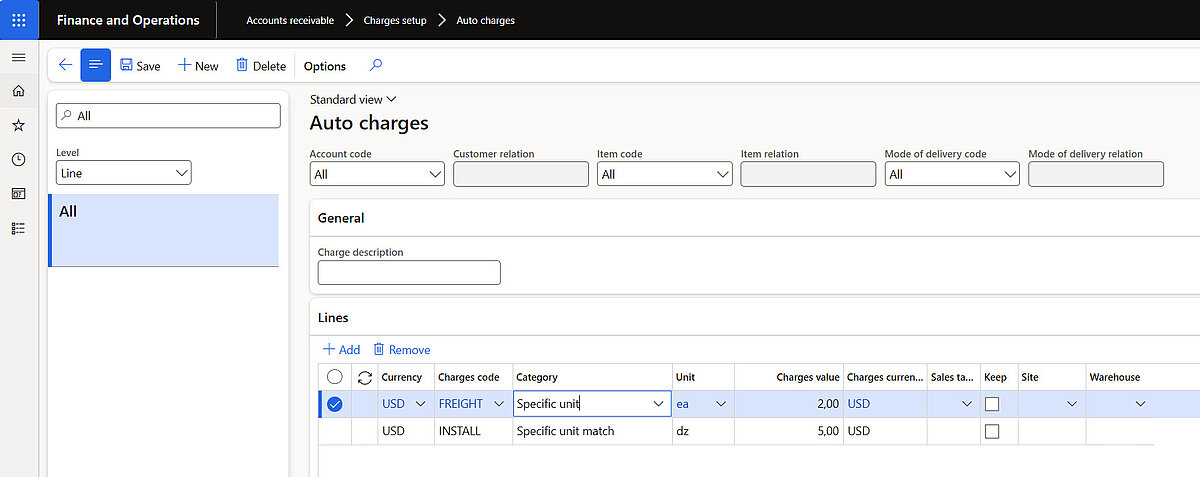
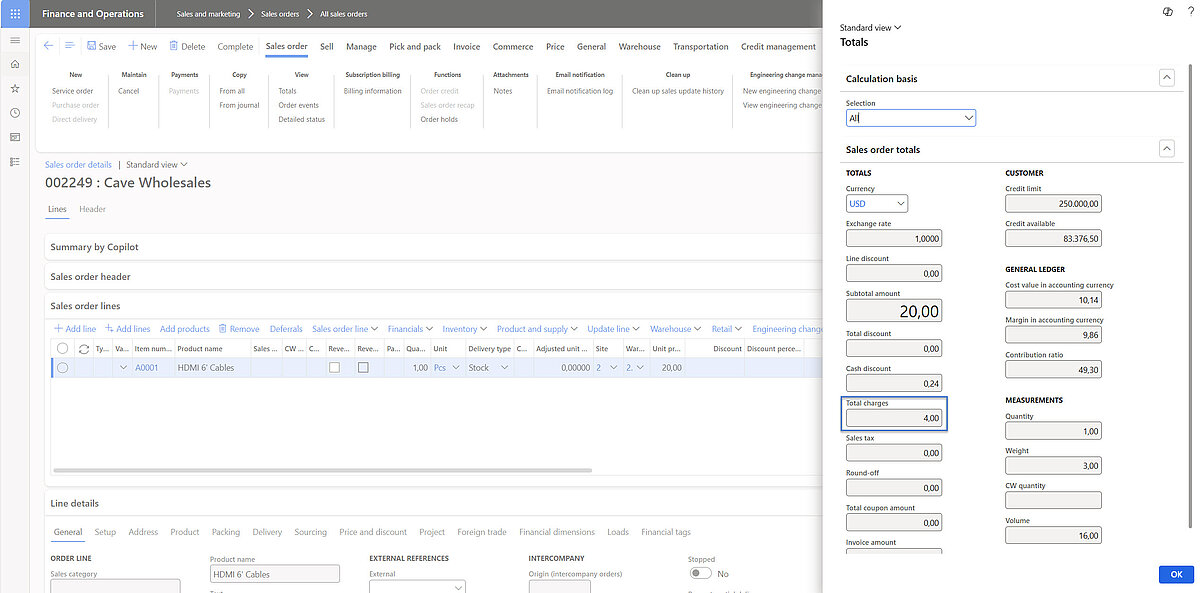
Auto charges that we have set up according to the company requirements: Freight cost of USD 2 per piece, installation cost of USD 5 per unit, and no additional header charges. With the new functionality, the units of measure for position-based charges can be defined as pieces and units.
In the newly created order, the configured automatic charges per line are visible here:
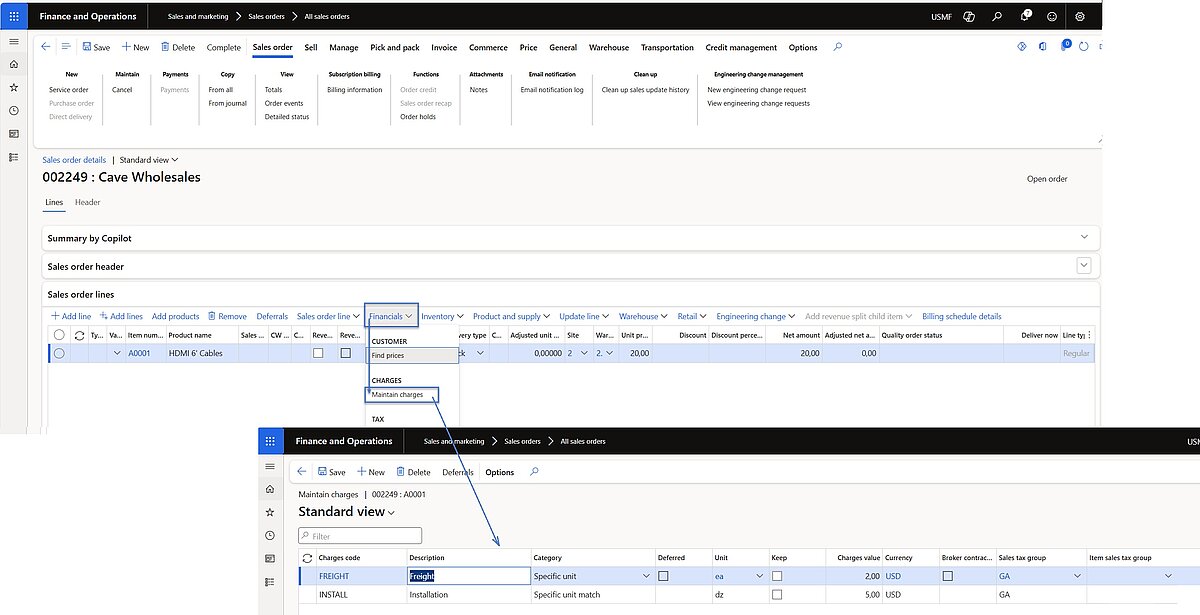
Since we only have 1 piece of the item in the order, and according to the settings for automatic line charges, the total amount of other surcharges for this example should be USD 2.
Summary
Although the “Unit of Measure for Line-Level Charges” capability appears minor, it plays a critical role in aligning Dynamics 365 with real-world business challenges. Companies dealing with complex bulk pricing structures, logistics, wholesale or international trade can benefit from improved cost precision, streamlined processes, and clearer reporting
Discover More with Dynamics 365 Supply Chain Management
Would you like to make your processes in purchasing, warehousing, production, and logistics even more efficient? With Microsoft Dynamics 365 Supply Chain Management, you can create transparency, automate workflows, and optimize your entire supply chain.
Learn how modern supply chain processes can support your business—from precise cost control to intelligent automation.
Contact Us Today
Would you like to learn more about the new features in Dynamics 365, or are you looking for support with your implementation? Our team would be happy to provide you with a personal consultation.