

D365 SCM 10.0.48: Procurement Agent with Supplier Communications and Impact Analysis
With Dynamics 365 Supply Chain Management version 10.0.48, Microsoft enhances the Procurement Agent with intelligent capabilities for supplier communication processing and business impact analysis. Incoming supplier emails are automatically identified, matched to the relevant purchase orders, and evaluated for potential risks and downstream process impacts. As a result, procurement professionals gain greater visibility into changes such as delivery date postponements, quantity reductions, or order cancellations and can take appropriate action at an early stage.
How Supplier Communications and Impact Analysis Work Together
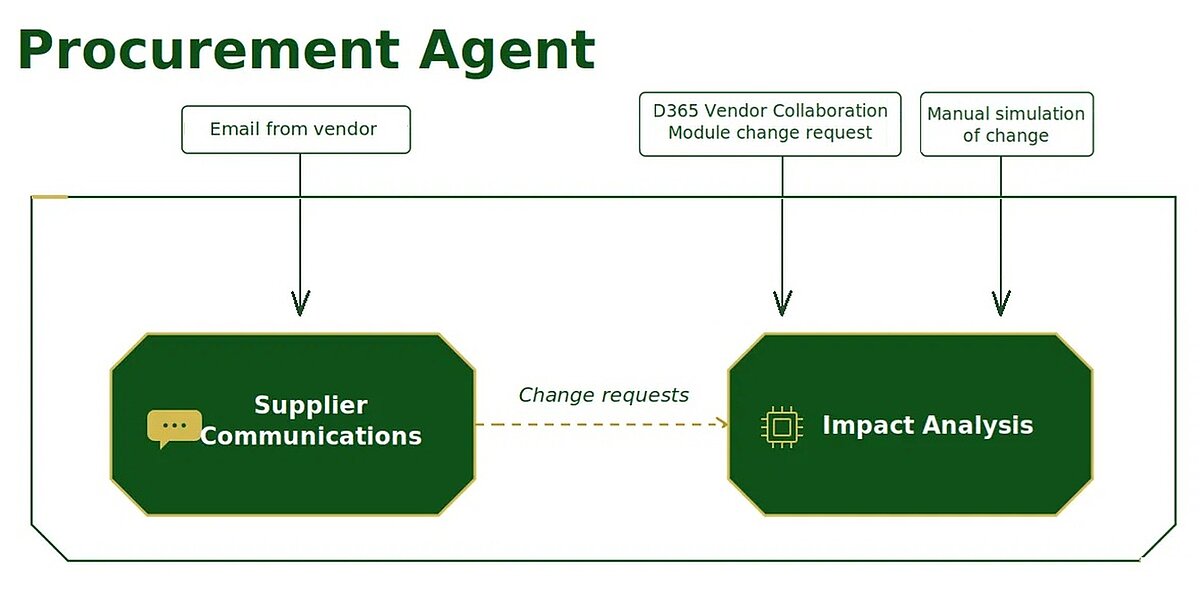
Starting with Dynamics 365 Supply Chain Management version 10.0.48, the Procurement Agent is enhanced with two key AI-powered capabilities: Supplier Communications and Impact Analysis. The goal is to significantly reduce manual effort in procurement processes while providing early visibility into the business impact of supplier-driven changes.
These two capabilities work together as part of an integrated procurement process. Supplier Communications manages communication related to purchase orders by automatically classifying incoming supplier emails, matching them to the appropriate purchase orders, and analyzing confirmations as well as requested changes.
When the Procurement Agent detects a supply-relevant change, such as a revised confirmed delivery date, a quantity reduction, or the cancellation of a purchase order line, Impact Analysis can evaluate the potential consequences for downstream business processes.
To achieve this, Impact Analysis analyzes existing dependencies between supply and demand and determines whether inventory, production orders, sales orders, or transfer orders could be affected by the change. This allows potential risks and supply shortages to be identified at an early stage.
Procurement professionals therefore receive not only information about the detected supplier change, but also the corresponding business context. Based on this information, they can assess whether additional coordination, mitigation measures, or other actions are required before accepting the proposed change.
Supplier Communications and Impact Analysis deliver the greatest value when used together, but each capability can also be enabled and used independently to support specific business and operational requirements.
System Requirements
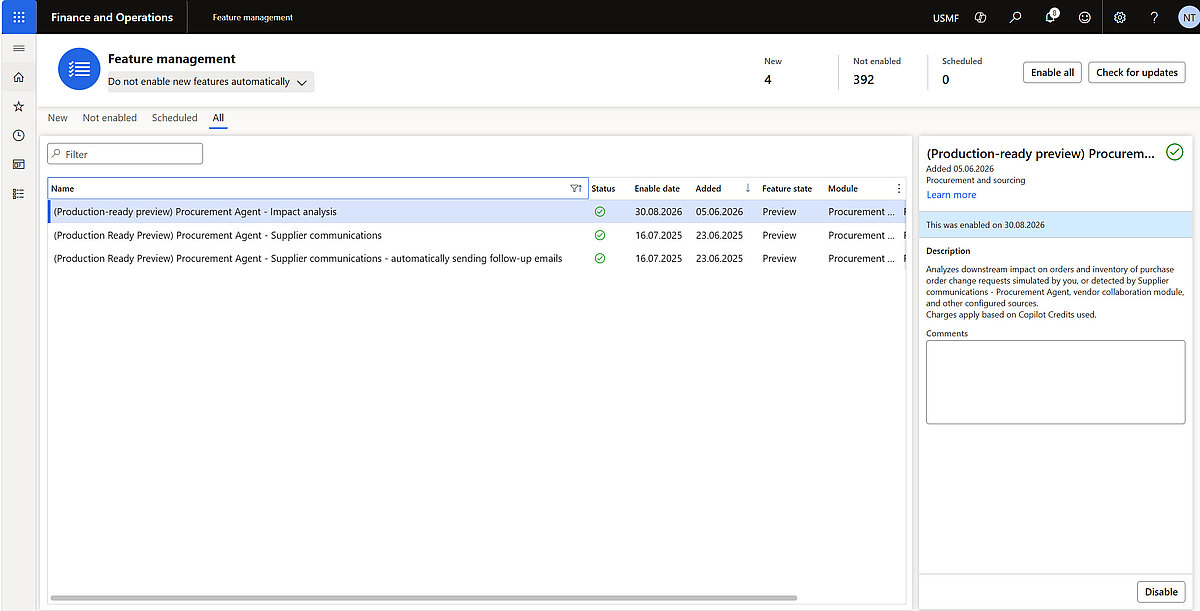
To use the Impact Analysis capabilities, the following prerequisites must be met:
- Microsoft Dynamics 365 Supply Chain Management version 10.0.48 (build 10.39.2117 or later). For version 10.0.48, Microsoft recommends using the latest available build.
- The Immersive Home, Agent management (Production-ready preview), and Procurement Agent - Impact Analysis features must be enabled in Feature management.
- Copilot for Finance and Operations apps version 1.0.03048.2 or later, and Copilot in Microsoft Dynamics 365 Supply Chain Management version 1.1.03510.1 or later. The components must be installed or upgraded in this sequence.
- A published Procurement Agent - Impact Analysis Copilot Studio agent in the target environment, along with an appropriate agent identity that has the required permissions.
Supplier Communications: Process Supplier Information More Efficiently
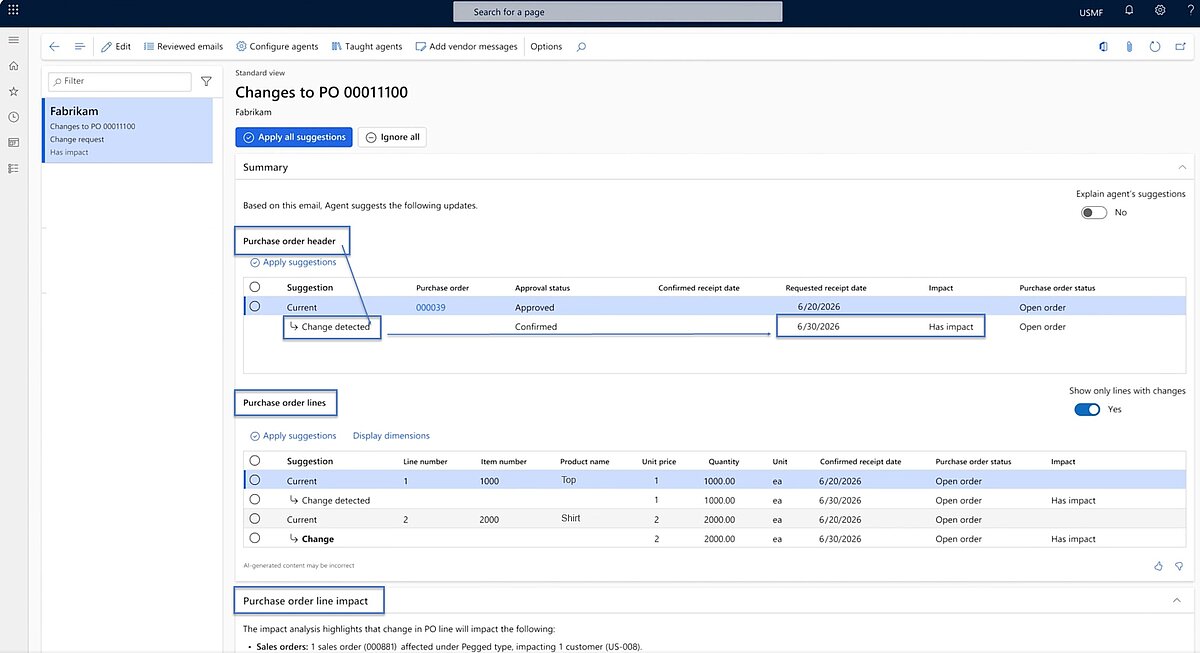
Supplier Communications helps procurement teams streamline the processing of incoming supplier information. Email content and attachments can be analyzed, matched to the relevant purchase orders, and presented as identified changes in a transparent and actionable manner. Typical examples include quantity changes, order cancellations, price or unit price adjustments, as well as updates to delivery and shipment dates.
For testing purposes, a full email integration is not required. Supplier messages can be entered manually in the Emails from vendors workspace. This approach allows organizations to understand which information the agent extracts, how messages are classified, and how identified changes are linked to the corresponding purchase orders.
As a result, a significant portion of the manual effort associated with reviewing supplier emails and updating purchase orders can be eliminated. Procurement teams can spend less time on routine administrative tasks and focus more on strategic sourcing, supplier management, and exception handling.
Impact Analysis: Identify the Impact of Purchase Order Changes at an Early Stage
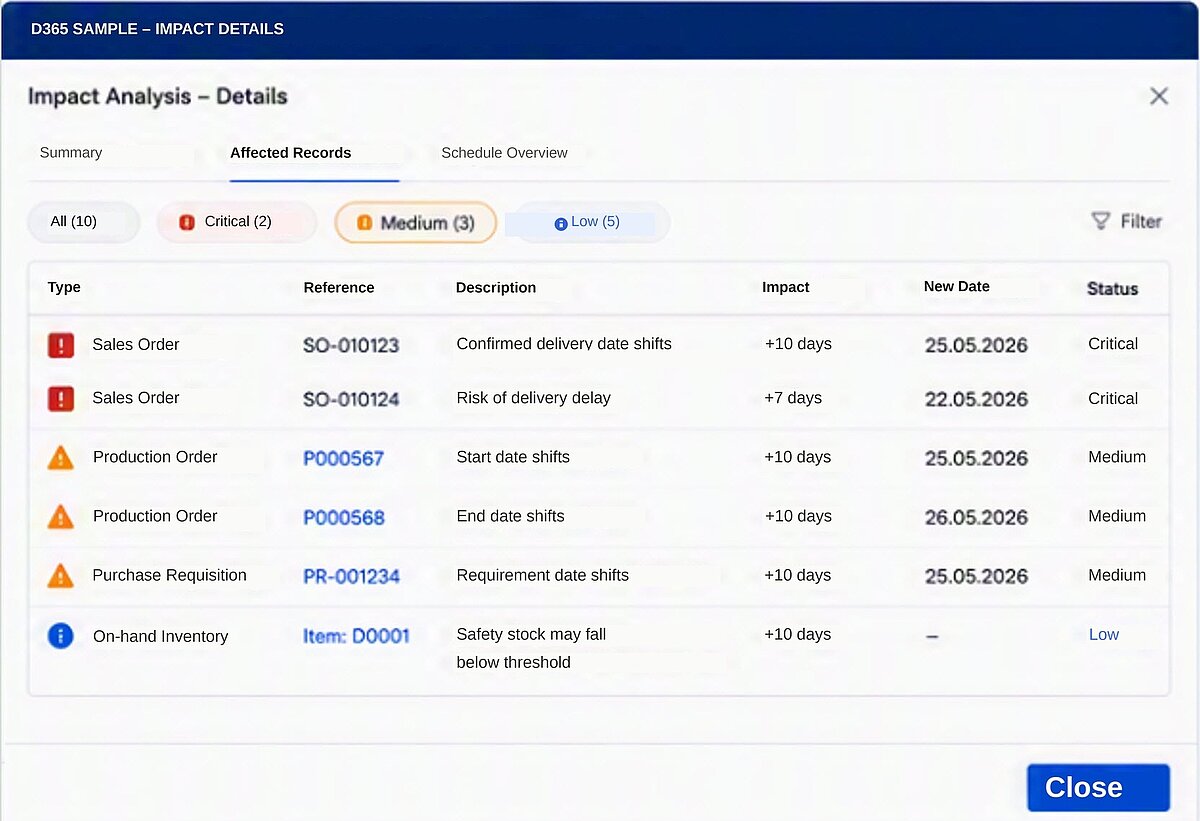
Impact Analysis evaluates the downstream effects of relevant changes to purchase order lines. These changes can include a revised confirmed delivery date, a reduced confirmed quantity, or the cancellation of a purchase order line. The analysis helps procurement teams identify potential risks to dependent demand and delivery commitments at an early stage.
Depending on existing supply and demand relationships, the analysis can reveal potential impacts on planned or released production orders, sales orders, transfer orders, and other related demand transactions. The results provide valuable decision support and help users understand the broader business implications of supplier-driven changes.
It is important to note that the analysis serves as a decision-support tool. Any required business actions, process adjustments, or system updates must still be reviewed, validated, and executed by the responsible user.
Business Benefits
The Procurement Agent makes collaboration with suppliers in Dynamics 365 Supply Chain Management significantly more efficient by automatically identifying, evaluating, and highlighting supplier-driven changes. This enables organizations to respond more quickly to supply disruptions, mitigate risks proactively, and improve planning reliability across the entire supply chain.
- Reduced manual effort when reviewing and assigning supplier information
- Faster response to quantity reductions, delivery delays, and order cancellations
- Early visibility into potential impacts on production, sales, and internal supply processes
- Fewer process disruptions through the integration of supplier communication, purchase order management, and impact analysis
- Improved decision-making for procurement professionals when managing critical supplier deviations
Implementation Considerations
Microsoft currently documents the Impact Analysis capabilities as a Production-ready preview feature. Before deployment, organizations should verify the required technical prerequisites, security roles, agent identity configuration, Power Platform connections, Copilot Studio deployment, and any applicable Data Loss Prevention (DLP) policies within the target environment.
In addition, it is recommended to perform business validation using realistic supplier scenarios and to establish clear responsibilities for reviewing, approving, and implementing any actions suggested by the Procurement Agent. This helps ensure that the solution is adopted effectively and aligned with existing procurement and supply chain processes.
Additional Information:
Microsoft Learn
Microsoft Learn
Optimize your procurement and supply chain processes
With Dynamics 365 Supply Chain Management, you can increase transparency, responsiveness, and planning reliability across the entire supply chain. Our experts show you how to leverage AI-powered capabilities to your advantage.