

D365 Apply Compound Charges to Quotations and Sales Orders
With the new feature in Dynamics 365 Supply Chain Management, businesses can now incorporate complex charge structures directly into their quotations and sales orders. This enhancement provides greater flexibility in pricing, ensures transparent and accurate tracking of total costs, and enables the automatic calculation of sophisticated charge structures.
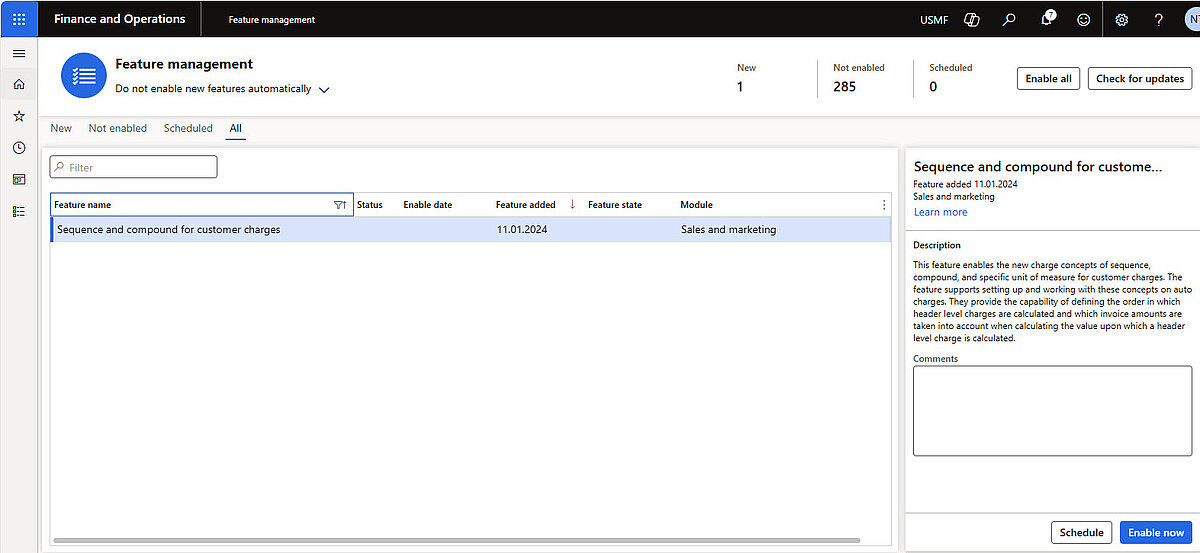
Benefits:
- Automatic charge sequences: Define the order in which charges are applied, allowing percentage-based markups on previously calculated amounts.
- Periodic charges: Add time-based charges, such as for rental or service periods.
- Line-specific charges: Assign specific charges to individual items or units.
- Enhanced transparency: All charges are clearly displayed in quotations and sales orders.
With this enhancement, surcharges can be calculated based on the current total order amount – including previously applied charges – rather than only on the original base value. This is particularly relevant in situations where the calculation base is variable, and additional charges need to be included.
In addition, minimum surcharges can be defined as covering fixed costs such as delivery expenses. This ensures that all costs are covered while maintaining efficient ordering processes, allowing businesses to set minimum surcharges or delivery fees for specific customers on any delivery day.
For companies with complex surcharge requirements, the system now provides the ability to configure compound surcharges as well as minimum surcharges for quotations and sales orders.
Compound surcharges
The new feature supports several types of compound surcharges, with the most important as sequence, compound, value base, include tax in value base, and unit specific line charge.
The value basis on which an auto charge is calculated can be adjusted by defining the charge as “compound”. According to setup, defined in the auto charge, the system calculates a compound charge, so aggregates all prior charges with lower sequence numbers into the base amount. This affects percentage-based header charges, line charges, and the net amount across all quotation and order lines. It is configurable whether the value basis includes line charges and their VAT, as well as other header charges and the sales tax for those charges.
Additionally, auto charges can be set up at the line level using the charge type “Specific unit of measure.” This allows companies to specify a particular unit of measure (UoM) to which the charge applies. The system compares the defined unit with the sales unit of the order line and considers any existing conversions. You can also require an exact match of the sales unit if needed.
Concept of Compound surcharges
- Compound Surcharges: Charges that build on top of each other rather than being calculated independently.
- Charge Sequence: Determines the order in which charges are applied. Later charges can include previous charges in their calculation.
- Header vs. Line Charges:
- Header charges apply to the entire order or quotation.
- Line charges apply to individual items.
- Impact on Pricing: Allows cumulative cost calculation, often used for scenarios like tax on freight or markup on handling fees.
Example of Compound surcharges
Scenario:
- You have a sales order with two charges:
- Freight Charge: $100
Insurance Charge: 10% of the total including freight
How D365 SCM applies it:
- System calculates the freight charge first: $100.
- Insurance charge is calculated as 10% of the subtotal (including freight):
- Subtotal = $100
- Insurance = $100 × 10% = $10
Total charges = $100 (freight) + $10 (insurance) = $110.
Header vs. Line Example:
- Header Compound Charges: Freight and insurance applied to the entire order.
- Line Compound Charges: If each item has its own freight and insurance, the compound logic applies per line.
Minimum surcharges
The minimum charge functionality has been extended to include the concept of period charges. This allows businesses to apply fees to customer orders that, over a defined period, do not meet specified criteria. This feature enables the configuration of rules for periodic charges to identify such cases and apply the appropriate fees.
Charges can be calculated based on a minimum charge amount (e.g., delivery fee), a minimum order quantity, or a combination of both. Three types of periodic charges are supported:
- Monetary threshold: If the total calculated delivery charges for a given period fall below the minimum value, the difference is invoiced as a fee on a free text invoice.
- Quantity threshold: If the minimum order quantity for the period is not met, a flat fee is applied on a free text invoice.
Combined threshold: Combines both criteria and generates a free text invoice to cover any shortfall.
Concept of Minimum surcharges
- Minimum Surcharge: A predefined minimum amount that is applied when calculated charges fall below a certain threshold.
- Threshold: The defined amount below which the minimum surcharge is triggered.
- Application Logic:
- If the total calculated charges are less than the threshold, the minimum surcharge applies.
- If the total exceeds the threshold, normal charges apply.
- Header vs. Line Minimum Charges:
- Header Minimum charges apply to the entire order or quotation.
- Line Minimum charges apply to individual items.
- Impact on Pricing: Ensures a minimum cost baseline regardless of discounts or small quantities.
Example of Minimum surcharges
Scenario:
- You have a sales order with freight charges calculated based on weight.
The calculated freight charge for the order is $8, but your business rule requires a minimum surcharge of $15 for shipping.
How D365 SCM applies it:
- System checks the calculated charge against the defined threshold (minimum surcharge).
- Since $8 < $15, the system overrides the calculated charge and applies $15 as the final charge.
If the calculated charge had been $20, the minimum surcharge would not apply.
Header vs. Line Example:
- Header Minimum Charge: If the entire order’s freight is below $15, apply $15 at the header level.
- Line Minimum Charge: If each item line has its own freight calculation, apply the minimum surcharge per line if needed.
Conclusion
This feature enables businesses to implement complex pricing and charge models efficiently while improving calculation accuracy.
The use of compound charges simplifies the quotation process and enhances both efficiency and pricing precision, allowing organizations to manage processes more easily and communicate openly with clients.
Would you like to optimize your sales and supply chain processes and unlock the full potential of Microsoft Dynamics 365 Sales and Microsoft Dynamics 365 Supply Chain Management?
Discover our solutions or speak directly with the experts at the Dynamity Group!