

D365 Deferred Receiving Processing
Managing inbound operations can be challenging, especially when large volumes of goods arrive at once. Traditional processes often slow things down because every update has to happen immediately, creating system bottlenecks and frustrating delays. Deferred Receiving Processing changes that by introducing a smarter, more flexible approach. Instead of handling all updates on the spot, the system queues them for background processing. This means warehouse workflows stay smooth, fast, and uninterrupted—even during peak times.
This feature empowers warehouse teams to keep working without waiting for complex system updates to finish. When goods are received, the system confirms the action and allows the user to proceed with other tasks, while put-away work and related processes are generated in the background. By decoupling user actions from backend processing, Deferred Receiving Processing eliminates unnecessary delays and optimizes resource utilization.
Deferred processing really shines when there’s a lot of work to handle or when system load suddenly spikes. Instead of slowing everything down, heavy tasks are moved to the background and processed asynchronously. This keeps performance steady, even during busy periods. The result? Faster receiving, less waiting, and a smoother workflow for everyone.
Ultimately, Deferred Receiving Processing is more than a technical upgrade, it’s a smart way to make warehouse operations faster and more flexible. By simplifying inbound processes and reducing system strain, businesses can speed up receiving, keep workflows running smoothly, and boost overall efficiency. The result is a supply chain that’s ready to scale, adapt, and deliver greater value every day.
Basic Concept
Deferred Receiving Processing is designed to separate quick user actions from heavy system tasks. Instead of immediately generating put-away work lines or updating inventory records, the system confirms receipt and places those operations into a background queue.
This asynchronous model means users can continue working without waiting for complex updates to finish. From the user’s perspective, the experience feels instant and uninterrupted, while the system completes the detailed processing in parallel.
By deferring backend work, businesses reduce system strain, increase throughput, and maintain data integrity. This is especially helpful in high-volume environments or when server workload can spike without warning, ensuring smooth workflows and consistently responsive user experiences.
In short, the concept is about speed, flexibility, and scalability—allowing organizations to handle large inbound transactions efficiently without compromising accuracy or stability.
Key Benefits
Higher Throughput
Deferred processing significantly accelerates inbound operations. Instead of waiting for each put-away task to be finished before moving on, warehouse workers can quickly register incoming inventory and continue with other tasks. This streamlined approach reduces downtime and keeps goods flowing efficiently through the warehouse, even during peak periods.Improved Productivity
Unexpected server load or complex calculations often slow down traditional receiving processes. By moving these heavy tasks to the background, deferred processing ensures that workers remain productive and uninterrupted. This means less waiting, fewer delays, and smoother experience for everyone involved in the workflow.Operational Flexibility
Modern supply chains face unpredictable challenges, from sudden spikes in activity to large volumes of work lines. Deferred processing provides the flexibility to handle these scenarios without compromising speed or accuracy. By processing tasks asynchronously, businesses can maintain consistent performance and adapt quickly to changing demands.- Enhanced User Experience
Beyond technical benefits, deferred processing improves the day-to-day experience for warehouse teams. Workers no longer need to pause and wait for systheavys—they can keep moving confidently, knowing that the system is handling the heavy lifting in the background. This creates a more efficient, stress-free environment that supports both speed and reliability.
How It works
Receiving goods no longer means waiting for the system to catch up. As soon as items are received, the system acknowledges the action and allows the user to continue working without interruption. Detailed tasks, such as creating put-away instructions, are not processed right away—they are queued and handled asynchronously. This means the workflow appears immediate and smooth, while the system takes care of the heavy lifting in the background.
Heavy system operations like generating work lines or updating inventory can often cause interruptions. Deferred Receiving Processing solves this by handling those tasks in the background, ensuring that front-end activities remain fast and responsive. This separation guarantees data integrity while allowing users to continue working without disruption.
The concept is similar to real-world experiences, such as making payments at a grocery store. The customer sees the transaction as complete, even though the backend settlement happens later. In Dynamics 365 SCM, the same principle applies: the user receives confirmation that the task is finished and can proceed with inventory movement or receiving, while the system processes the detailed work in the background.
Deferred Receiving Processing isn’t just about speed—it’s about enabling growth. By handling tasks in the background, companies can process high-volume transactions with ease while maintaining data integrity. This approach reduces delays, optimizes system resources, and provides a user-friendly experience that scales with business needs and adapts to changing demands.
Use Cases
1. High-Volume Receiving During Peak Periods
When warehouses receive large shipments or experience seasonal spikes, processing every put-away task immediately can overload the system and slow down operations. Deferred processing allows workers to register goods quickly while the system handles complex updates in the background, ensuring smooth workflows even under heavy load.
2. Complex Work Creation with Multiple Lines
Inbound transactions often involve creating numerous work lines for put-away, staging, or quality checks. Generating these lines in real time can cause delays. By deferring this process, the system queues these tasks for asynchronous execution, enabling workers to continue without waiting for backend operations to finish.
3. Environments with Unpredictable Server Load
In scenarios where server performance fluctuates due to ad-hoc or unplanned processing demands, deferred processing helps maintain stability. Heavy tasks are shifted to background jobs, reducing strain on the system and preventing disruptions to user productivity.
4. Cross-Docking and Rapid Turnaround Operations
For businesses that rely on fast-moving goods—such as cross-docking or just-in-time delivery—speed is critical. Deferred processing ensures that receiving confirmations happen instantly, allowing inventory to move quickly through the warehouse while detailed system updates occur later.
5. Large-Scale Implementations and Multi-Site Warehouses
Organizations operating multiple warehouses or large-scale facilities often face challenges with system performance during simultaneous receiving activities. Deferred processing provides scalability by distributing workload over time, ensuring consistent performance across all sites.
6. Regulatory or Compliance-Heavy Environments
Industries like pharmaceuticals or food distribution require accurate data but also need efficient workflows. Deferred processing ensures compliance by maintaining data integrity while reducing operational delays, making it ideal for regulated sectors.
The Airport Check-In Analogy
At a busy airport, every passenger must check in, confirm the booking, and drop off luggage. If the airline had to fully process each piece of luggage, update the aircraft load plan, and finalize all backend systems before the passenger could leave the counter, the entire check-in process would slow down dramatically, creating long queues and delays.
Instead, the airline confirms the check-in immediately, issues the boarding pass, and allows the passenger to proceed. Meanwhile, detailed backend tasks—such as updating baggage weight and adjusting aircraft balance—are completed later in the background. From the passenger’s perspective, the process feels quick and seamless, even though the system continues working behind the scenes.
Deferred Receiving Processing in Dynamics 365 SCM follows the same principle. When goods arrive at the warehouse, the system instantly acknowledges the receipt, allowing operations to continue seamlessly without any delays. Complex operations—such as generating put-away work lines and updating inventory records—are deferred and processed asynchronously. This ensures speed and continuity for the user while maintaining accuracy and data integrity in the background.
Just like the airport example, this approach prevents bottlenecks, keeps workflows moving, and delivers a better operational experience. It is a practical solution for handling high-volume transactions without compromising performance or reliability.
The Conveyor Belt Analogy
Imagine a large distribution center with a conveyor belt system. Every time a package arrives, the system needs to scan it, determine its destination, and then route it to the correct lane. If the system had to fully process each package—including updating inventory records, calculating optimal storage locations, and confirming all backend data—before allowing the next package onto the belt, the entire flow would slow down. Workers would stand idle while the system completes these complex tasks, creating bottlenecks and reducing overall efficiency.
Instead, the conveyor belt keeps moving. The system performs a quick initial check, confirms the package, and lets it continue down the line. Meanwhile, all the detailed backend operations—such as updating stock levels and generating put-away instructions—are handled asynchronously in the background. From the worker’s perspective, the process feels seamless and uninterrupted, even though the system is still working behind the scenes.
Deferred Receiving Processing in Dynamics 365 SCM works the same way. When goods arrive at the warehouse, the system immediately confirms receipt, allowing workers to continue scanning without delays. Complex tasks like creating put-away work and updating inventory are deferred and processed in the background. This approach minimizes waiting time, keeps workflows moving, and ensures accuracy without sacrificing speed.
The Warehouse Receiving: Immediate (Regular) and Deferred Receiving
The key difference between regular receiving and deferred receiving lies in how the system handles put-away work—either immediately after each scan, causing potential pauses, or asynchronously in the background, enabling uninterrupted scanning and faster workflows.
- Scenario 1: Regular Receiving – The “Stop-and-Go” Process
Picture a warehouse worker scanning items from a newly arrived load that contains multiple purchase orders. With regular receiving, every time an item or license plate is scanned, the system immediately begins creating the related put-away work. This involves applying all the configured rules to determine where the item should go in the warehouse.
For simple configurations, this happens quickly. But when put-away rules are complex—such as multiple zones, restrictions, or advanced strategies—the worker must wait for the system to finish before moving on to the next item. Each pause may be short, but across dozens or hundreds of items, these delays accumulate, creating idle time and slowing down the overall process. It’s a classic “stop-and-go” workflow.
- Scenario 2: Deferred Receiving – The “Continuous Flow” Process
Now imagine the same situation, but with deferred receiving enabled. The worker scans each item or license plate without interruption. Instead of processing put-away work immediately, the system defers these tasks and handles them asynchronously in the background.
From the worker’s perspective, the job feels seamless: scan, confirm, move on. There’s no waiting for complex logic to run. Meanwhile, the system quietly creates all the necessary put-away work behind the scenes, ensuring accuracy and compliance with warehouse rules. This approach transforms the workflow into a continuous flow, reducing idle time and improving efficiency—especially in high-volume or complex environments.
Configuration Logic for Deferred processing
The image below illustrates the configuration process for deferred warehouse work. On this page, users define the work order type the policy applies to, select the operation type, and choose the processing method for work lines.
- Immediate: Processes work lines instantly, similar to when no policy is applied.
Deferred: Uses the batch framework to process work asynchronously.
Threshold settings determine when deferred processing is triggered. A value of 0 means no threshold—deferred processing is used whenever possible. For sales and transfer work, the threshold is based on the number of source load lines; for replenishment work, it’s based on the number of work lines. For example, setting a threshold of 5 for sales means smaller works with fewer than five load lines use immediate processing, while larger works use deferred processing. Thresholds only apply when the method is set to Deferred.
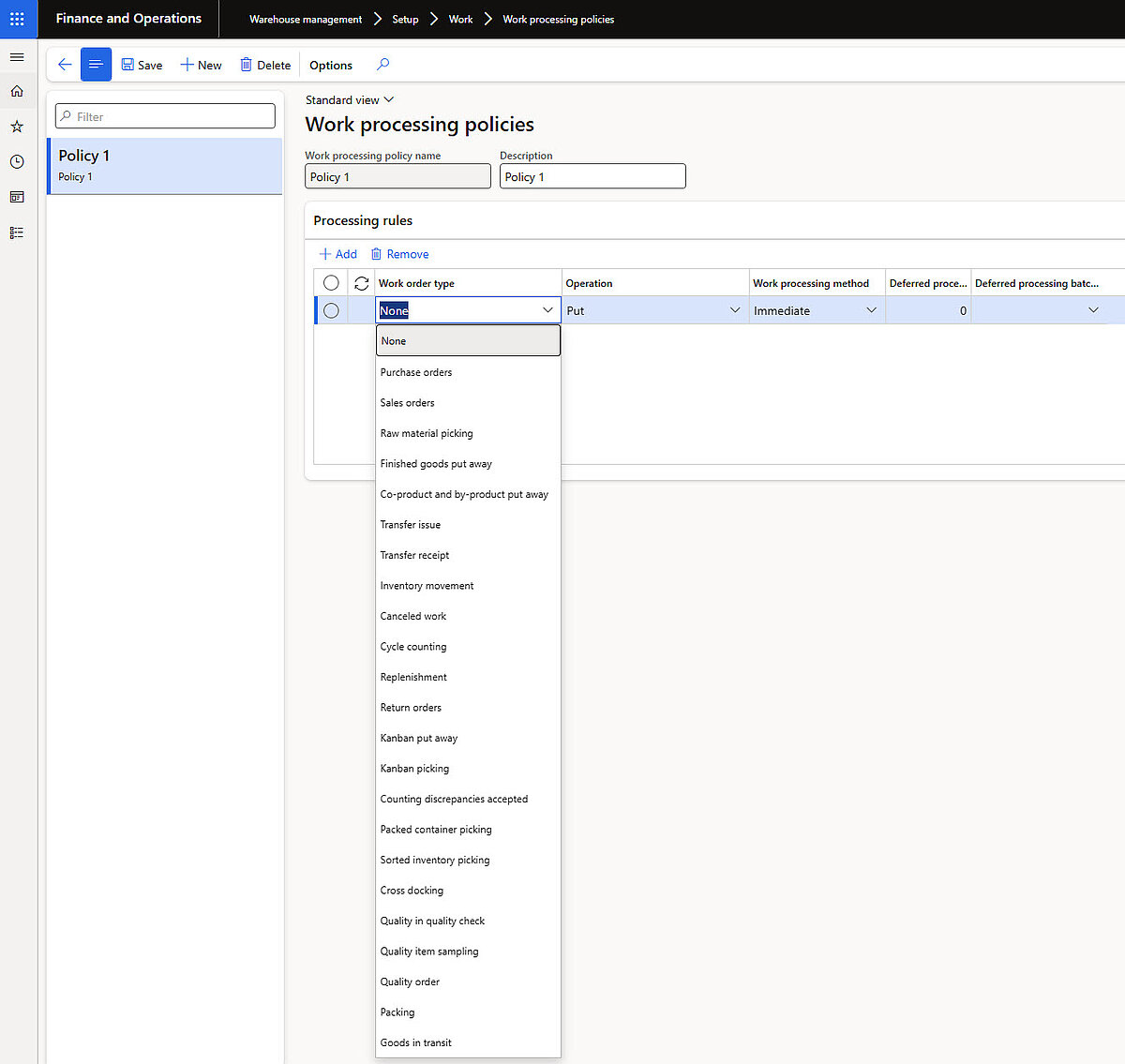
Configuration of deferred warehouse work processing
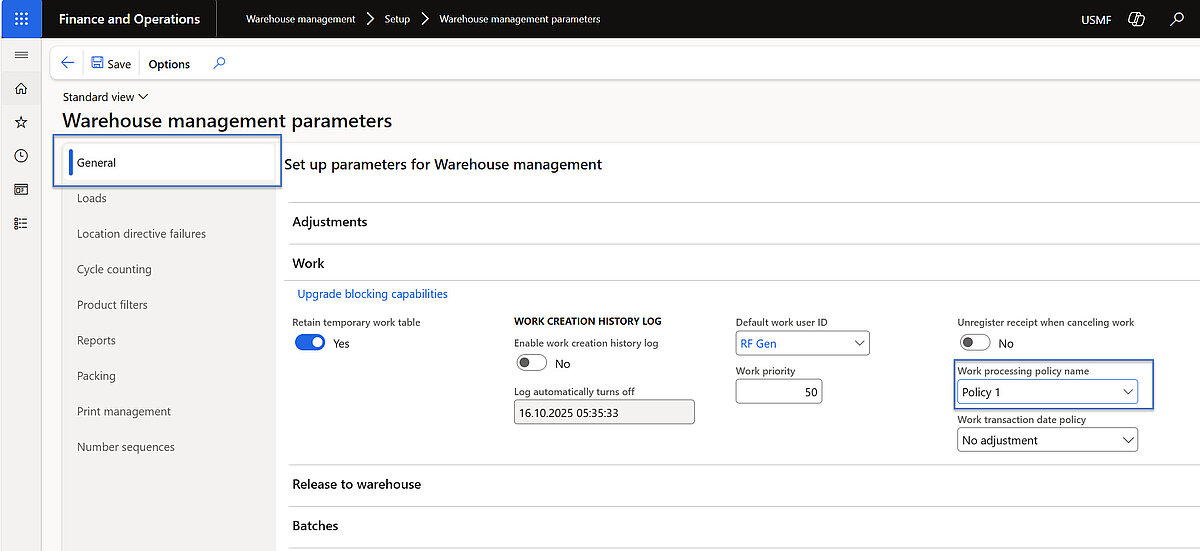
- Work Processing Policy - See Picture 1 above.
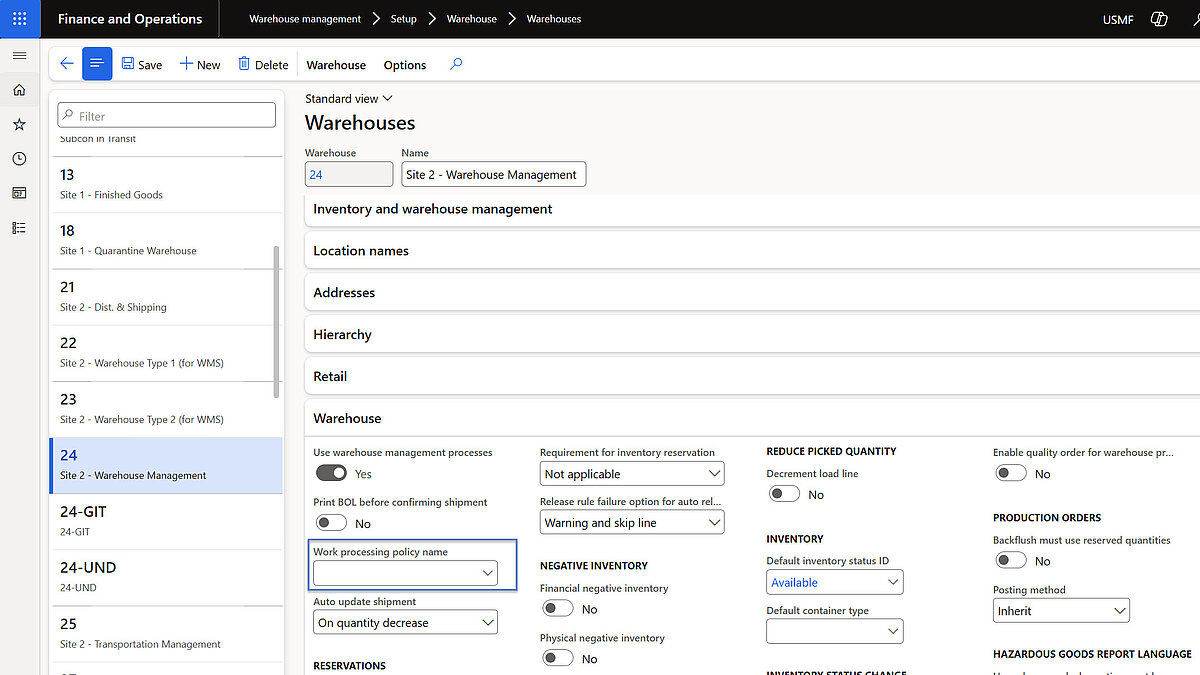
- Assign Work Creation Policy - Can be set globally or per warehouse.
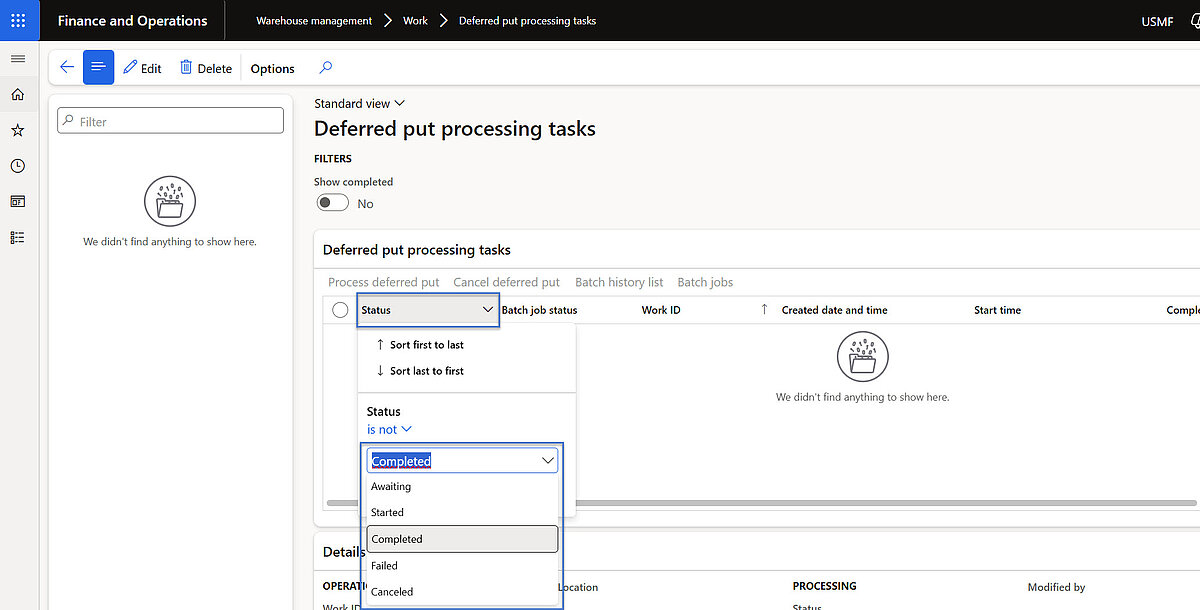
- Deferred Put Processing Tasks – Tasks can be showed here with status options: Awaiting, Started, Completed, Failed, Canceled. Failed tasks can be reprocessed or canceled. Completed tasks can be deleted.
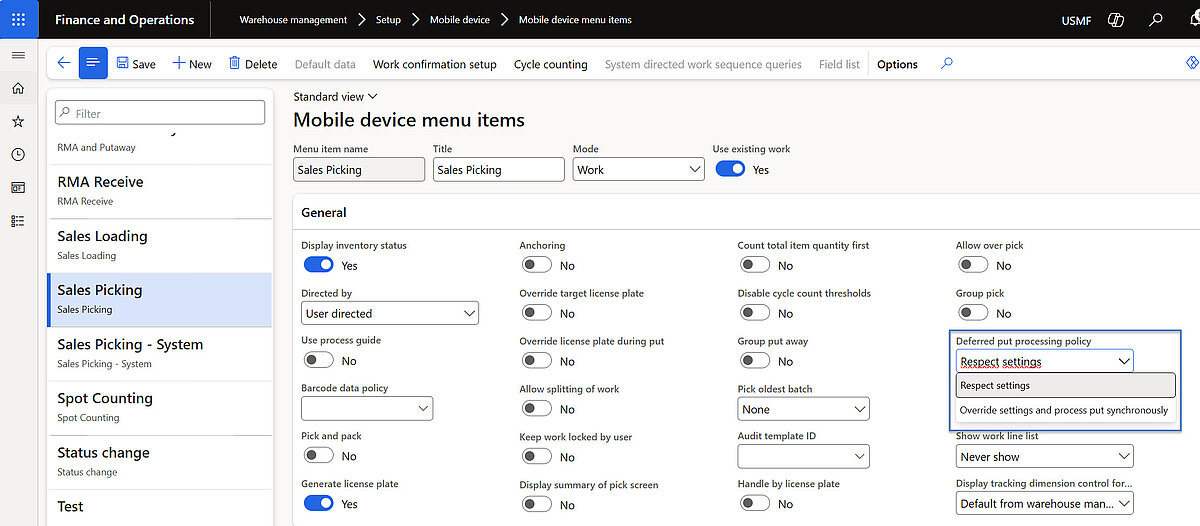
- Mobile Device Menu Override - Option to skip deferred processing and process immediately
Implementation and Supported Processes
This feature can be applied to the following receiving methods in your warehouse:
- Purchase order item receiving
- Purchase order line receiving
- Transfer order item receiving
- Transfer order line receiving
- Load item receiving
- License plate receiving
For deferred put-away processing, the following work order types are supported:
- Sales orders
- Transfer order issues
- Replenishment orders
Prerequisites
- Dynamics 365 SCM Environment
- The feature is available in Warehouse Management–enabled environments.
Ensure that the latest updates for Dynamics 365 SCM are installed, as Deferred Receiving Processing is part of recent releases.
- Warehouse Management Configuration
- Warehouse Management must be activated for the legal entity.
Warehouses involved in receiving must be set up with Work Templates and Location Directives.
- Work Processing Policies
- Access to the Work Processing Policies page is required.
- Work Processing Policies for inbound work creation must have Deferred as the processing method.
Deferred processing threshold should be configurated (e.g., minimum number of load lines before deferring).
- Batch Framework
- Batch processing must be enabled because deferred tasks run asynchronously via batch jobs.
Batch servers must be available and properly configured for background execution.
- Security Roles
- Users must have appropriate roles such as Warehouse Manager or System Administrator to configure and manage deferred processing settings.
Want to optimize your warehouse processes and unlock the full potential of Dynamics 365 SCM?
Discover our supply chain solutions or contact the Dynamity Group today.