

D365 Auto charge compounding and sequencing
The advanced auto charges functionality in Dynamics 365 enables precise and flexible application of charges at both header and line level for sales quotations and orders. By considering customer criteria and product details, specific surcharges can be automated and calculated consistently.
A key feature of this functionality is the ability to configure header charges as compounded. This setting influences the calculation basis for charges and ensures that complex pricing structures are accurately represented.
The following sections explain the logic behind compounding, the role of sequences, and the available options for defining the value basis for compounded charges.
Header compounding defines how the calculation base for auto charges is determined. When compounding is active, all header charges with a sequence equal to or lower than the compound charge are added to the total of line net amounts. This combined sum amount is defined as the value base. The value base can be set to either Sum of line net amounts only or Sum including charge amounts. Compounding applies exclusively to charges categorized as Percent.
To calculate compounded header charges, a sequence must be specified. This sequence establishes the order of calculation and is applicable only at the header level. Its impact occurs exclusively when charges are configured for compounding.
Based on feature configuration, interim header charge totals can be calculated either on the sum of line net amounts alone or on the sum that includes all line charges and applicable taxes. During the calculation process, these interim amounts establish the value base for later compound charges.
A default header charge sequence can be specified if required, and it will be automatically applied to all new sales quotations and orders.
When multiple header charges share the same sequence, their position determines the order of application during compounding. This positional effect occurs only if one or more charges are configured for compounding.
Prerequisites
- Microsoft Dynamics 365 Supply Chain Management version 10.0.38 or later.
- The feature that's named Sequence and compound for customer charges must be turned on in Feature management.
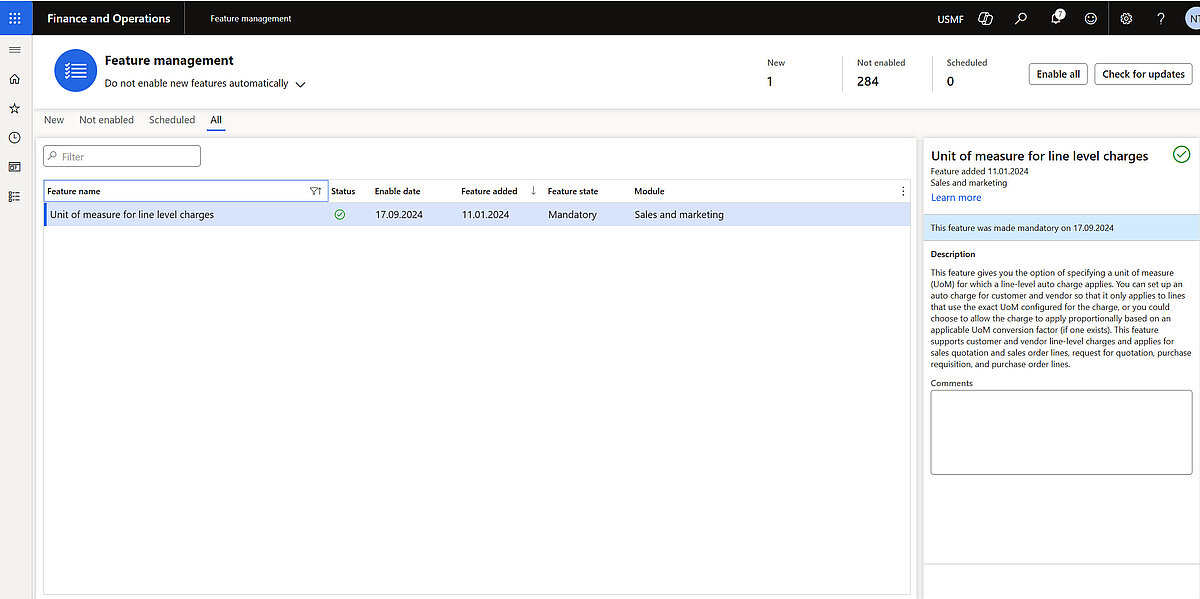
The Feature “Sequence and compound for customer charges” extends the “Accounts receivable parameters” page on the “Prices” tab by adding new fields in the “Charges” FastTab to configure the summarization logic.
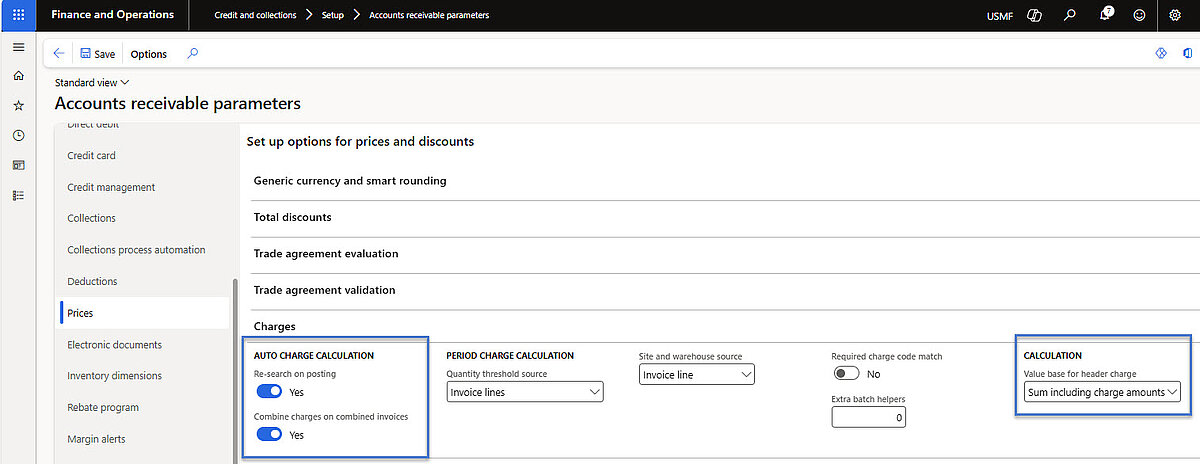
The new Fields in the “Charges” FastTab are:
- Re-search on posting – This option specifies if header auto charges for sales orders and quotations should be re-evaluated upon document confirmation or posting. Charges entered manually are not impacted. Select Yes to guarantee that configured header auto charges are always enforced.
Combine charges on combined invoices –The option defines the calculation method for auto charges when multiple sales orders are consolidated into one invoice using the Summary update function. Selecting Yes applies the auto charge to the combined total of all orders. Selecting No applies individual auto charges to each order in the combined invoice.
- Value base for header charges – Two options to determine the value base for calculating percentage-based header charge calculations:
- Sum of line net amounts only – Calculates charges based exclusively on line net amounts. This setting maintains compatibility with previous calculations before the Sequence and Compound for Customer Charges feature was enabled.
Sum including charge amounts –Calculates charges based on line net amounts plus line charges. When this setting is chosen, tax amounts can also be included by defining tax codes. For individual auto charge lines, this can be managed via the Include taxes in value base button on the Lines FastTab of the Auto charges page.
The Feature “Sequence and compound for customer charges” also added new columns on the page “Auto charges”, on Lines FastTab, such as: Sequence, Compound, and Position columns
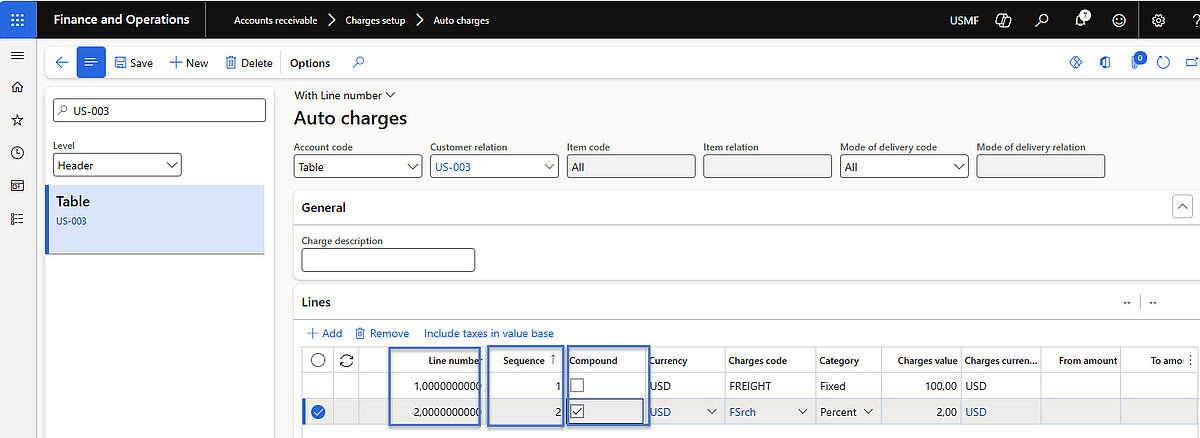
The Auto charges page contains the following fields for charge settings:
Position – Use this field to prioritize the calculation of each charge line. Lines are calculated in sequence, starting with the line that has the lowest Position value (because the lowest position has the highest priority). This value is automatically generated for all auto charge lines, based on each line's Sequence value on the Auto charges page. However, it's still editable and can be manually updated. Each Position value must be unique for each order. There can be no overlaps.
- Sequence – This field indicates the intended position of the charge as it's set up on the Auto charges page. For default charge lines, the value is copied from the auto charge setup. For custom charge lines that are manually added to the Maintain charges page, the value is set to 0 (zero). Sequence numbers don't have to be unique and might therefore overlap. If the auto charge setup includes overlapping sequence numbers, the system assigns unique Position values, starting with the most specific (customer) record. Although the Sequence field is editable and can be manually updated, we recommend that you keep it aligned with the Position value.
- Compound – Use this option to specify whether the line should be compounded with other header charges that have been added so far. This option applies only to charges that have a Category value of Percent. Compounding applies only to charges that are added by the auto charge setup. Although the system allows you to select the Compound option for manually added charge lines, compounding isn't actually performed for those lines.
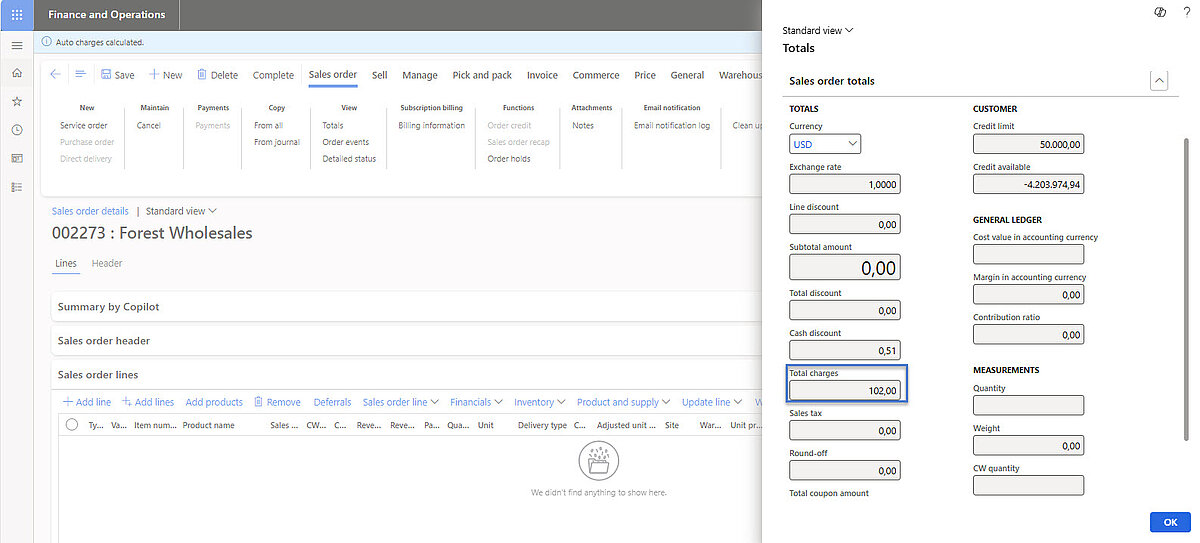
For the US-003 example below, the order includes an additional 2 percent compound charge, which is applied to the order together with a fixed auto charge of 100 USD. As a result, the header charges total 102 USD.
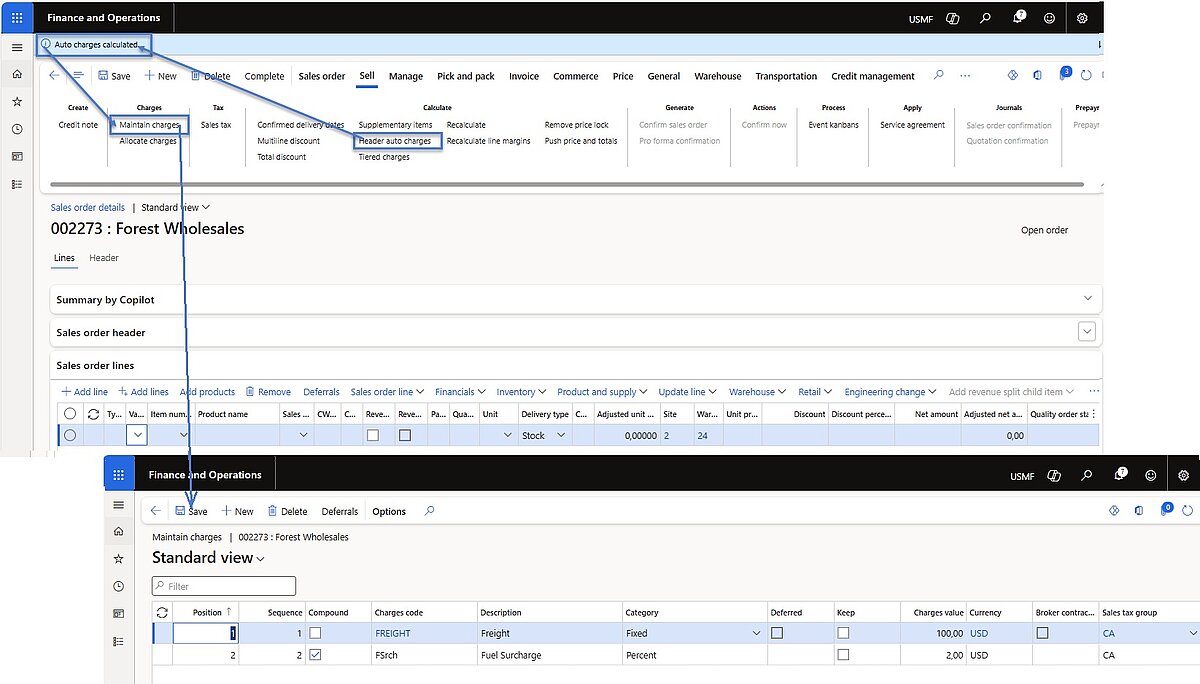
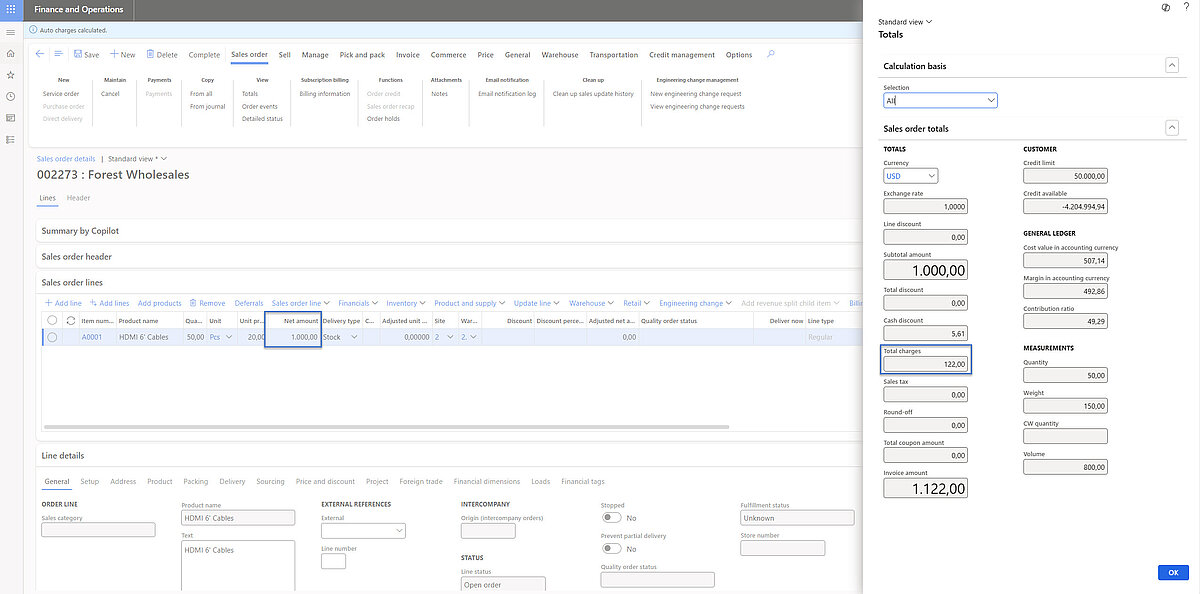
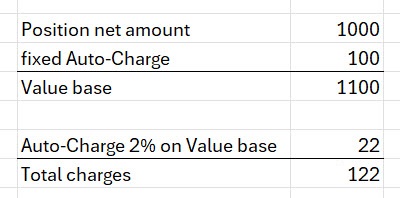
The 2 percent charge also applies to each order line. In this example, an item with a net value of USD 1,000 is entered on the order. After the automatic calculation of header charges, the total amount of additional charges is USD 122.
It’s possible for users to adjust the assigned Position, Sequence, and Compound values on a header charge created by auto charges. Be aware that such adjustments may significantly impact the value base used for compound charges.
Do you want to optimize your processes end-to-end – from quote creation to delivery and invoicing?
With Microsoft Dynamics 365, you create an integrated platform for sales, finance, supply chain, and omnichannel – including automation, transparency, and AI support.
Discover our solutions or speak directly with the experts at Dynamity Group!