
Opportunities with AI Agents in Dynamics 365 F&O
AI Agents in Dynamics 365 F&O
The future of finance and operations is here. AI Agents in Dynamics 365 F&O empower businesses to move beyond traditional systems and embrace intelligent, adaptive processes.
Designed to automate sophisticated workflows and deliver instant insights, AI Agents connect seamlessly with ERP data and deliver real-time insights that drive smarter decisions. By leveraging AI-driven capabilities, organizations can reduce manual effort, improve accuracy, accelerate operational efficiency and achieve greater agility.
AI Agents convert Dynamics 365 F&O from a static repository into a powerful engine for action. This transformation enables businesses to respond faster to market changes, optimize resources, and unlock new levels of agility and innovation.
With this transformation, businesses can go beyond simply storing data—they can act on it intelligently and in real time. AI Agents are designed to automate repetitive tasks, orchestrate complex workflows, and integrate seamlessly with ERP processes. They don’t just respond to commands; they proactively analyze data, identify patterns, and recommend actions that drive efficiency and innovation.
Imagine closing financial periods faster, optimizing supply chains dynamically, or predicting operational bottlenecks before they occur. These capabilities are no longer aspirational—they’re becoming reality with AI Agents in Dynamics 365 F&O. By combining ERP data with advanced AI models, organizations gain a powerful toolset to reduce manual effort, improve accuracy, and accelerate decision-making on a scale.
This evolution marks a new era for enterprise systems: one where finance and operations are not static records but intelligent engines of action. Businesses that embrace this shift will unlock agility, resilience, and competitive advantage in an increasingly data-driven world.
Basic concepts
An Agent is an autonomous or semi-autonomous software entity designed to perform tasks on behalf of a user or system. In the context of AI, an agent is much more than a simple script—it is an intelligent component that designed to interpret instructions, access resources, and execute tasks, make decisions, and take actions within defined boundaries.
Agents are often powered by AI models and can operate interactively or autonomously to streamline workflows, responding to user queries—or independently, running scheduled or event-driven processes. This makes them essential for modern enterprise solutions like Dynamics 365 F&O, where efficiency and intelligence are critical.
Core characteristics of Agents:
- Instruction Interpretation:
Agents understand user commands, often provided as prompts or natural language instructions. They translate these instructions into actionable steps, leveraging AI-driven reasoning. - Access to Data and Services:
Agents can connect to various data sources (e.g., CRM records, ERP systems, external APIs). They retrieve, process, and analyze data to provide insights or perform operations. - Turning Decisions into Outcomes:
Beyond data retrieval, agents can execute tasks such as updating records in Dynamics 365, triggering workflows or business processes, sending notifications or generating reports. - Purposeful and Result-Oriented:
Agents aim to achieve specific objectives, such as automating repetitive tasks, enhancing decision-making with predictive analytics, improving customer engagement through personalized interactions. - Guided Interaction and Full Automation:
Agents can work interactively, assisting users step by step, or autonomously, executing predefined processes without supervision.
Prompt - is an instruction or input provided to an AI system (like Copilot or other AI models) that guides its behavior and determines the output. It’s essentially the way you “communicate” with the AI to achieve a specific goal. It can be a question, a command, background information or constraints. The quality and clarity of the prompt directly influence the accuracy and relevance of the AI’s output.
Core characteristics of Prompt:
- Instructional Prompts: Direct commands
A prompt tells the AI what you want it to do, for example: “Summarize this document.” or “Generate a list of benefits for Dynamics 365.” - Contextual Prompts: Include background info
Prompts often include context to improve accuracy: “Summarize this document for a sales audience.” or “Create a marketing email using a friendly tone.” - Conversational Prompts: Used in chat-based systems
Prompts can be simple “Translate this text into English.” or complex “Analyze this dataset and create a bar chart showing monthly revenue trends.” - Multi-Step Prompts: Combine tasks
Prompts can adapt to different tasks: Writing content, generating code, answering questions, creating workflows, etc.
Prompts serve as the language of intent, while agents act as the executors of action—together, under Microsoft’s Dynamics 365 ERP Model Context Protocol (MCP), they enable a new era of intelligent, context-aware enterprise automation.
Microsoft is reshaping the future of enterprise operations with the Dynamics 365 ERP Model Context Protocol (MCP). Introduced at Microsoft Build 2025, MCP establishes a standardized, governed way for AI agents, applications, and services to connect operation system and analytical insights. What began as a milestone for connecting AI and ERP systems has progressed into a dynamic framework that now integrates analytics context—entering public preview in December 2025.
This is not merely an integration; this is more than a technical connection. It is a catalyst for transformation and defines a turning point from systems of record to systems of action.
By enabling AI agents to seamlessly interact with ERP processes, data, and analytics pipelines, MCP unlocks autonomous business operations and agentic innovation across finance and operations. With MCP, organizations can connect their code, data, and tools to AI platforms like Copilot, Claude, and Cursor—opening the door to intelligent, automated decision-making at scale.
What is MCP?
The term Model Context Protocol (MCP) consists of three parts: Model, Context, and Protocol.
Model - is a familiar concept, is nothing new, especially today with the rise of large language models (LLMs) like ChatGPT (OpenAI), Gemini (Google), or Claude (Anthropic). These models power tools such as Microsoft Copilot, where should be selected first which model an agent will be used during configuration.
Many assume models search the internet for answers—but that is not true. Instead, they predict the next word based on patterns learned from massive datasets. They do not pull live data or know real-time facts; they act as language experts, built on extensive text-based training data.
Context - is the background information you provide to the model. Think of an email subject line - it gives the recipient an idea of what the message is about before opening it. When you communicate with ChatGPT, Claude, or Copilot, the input you give serves - whether a question or some background—forms the context that shapes its reply.
Better context leads to better answers, the richer the context, the more accurate and relevant response. Context is the key to unlocking the full potential of large language models.
The better the context, the better the answer. That’s why context is critical factor for LLM performance.
Protocol – is simply a set of rules. In software development, protocols define how systems interact, they are part of a developer’s daily work. AI agents and applications follow the same principle, they need a clear set of rules to communicate and share data, require structured standardized rules to exchange information effectively.
In essence, Model Context Protocol is a standardized framework that defines how context is passed to models, ensuring structured and reliable interactions between AI agents, data, and tools.
While MCP defines the rules for structured communication, the MCP-Server implements these rules in practice, serving as the gateway through which AI agents connect to enterprise systems and execute business actions.
What is MCP-Server?
An MCP-Server (Model Context Protocol Server) is a backend service that exposes structured functions, tools, and data resources to AI models and agents through a standardized protocol - Model Context Protocol (MCP).
MCP-Server delivers a standardized interface that allows AI models to communicate seamlessly with external systems such as ERP, CRM, APIs, and databases. Instead of embedding static API calls, it dynamically exposes available tools and operations in a structured, machine-readable format. It also handles session persistence, user context, and access control to guarantee secure and reliable interactions.
Agents can include MCP Server as an extension. For example, enhancing the ‘Copilot for Finance and Operations apps’ agent allow users to interact with MCP Server inside F&O via the Copilot chat interface. Because agents can be published to various channels, organizations gain flexible integration options. For example, MCP-Server integrates seamlessly with Copilot Sidecar, allowing users to query, create, update, and delete data through natural language commands.
Microsoft has shared plans to strengthen this foundation with two significant innovations:
- Dynamic ERP MCP Server
The Dynamics 365 ERP MCP Server is transitioning from a static model to a dynamic one, unlocking hundreds of thousands of ERP functions for secure, real-time access by agents, developers, and applications. This dynamic capability is now available in public preview. - Analytics MCP Server
A new MCP Server for analytics is being introduced, applying the same model-context principles to business intelligence and insights. This server will enter public preview in December.
How It Works?
- Client–Server Model
- MCP Client: Embedded within an AI agent or application (e.g., Dynamics 365 Copilot, GitHub Copilot).
- MCP Server: Publishes ERP functions, data endpoints, and available actions using standardized protocols such as JSON-RPC or HTTP/SSE.
- Process Flow
- The user submits a prompt (e.g., “Find blocked items”).
- The AI agent communicates with the MCP-Server to interpret and fulfill the request.
- MCP-Server executes the relevant ERP function and returns structured, actionable results to the agent.
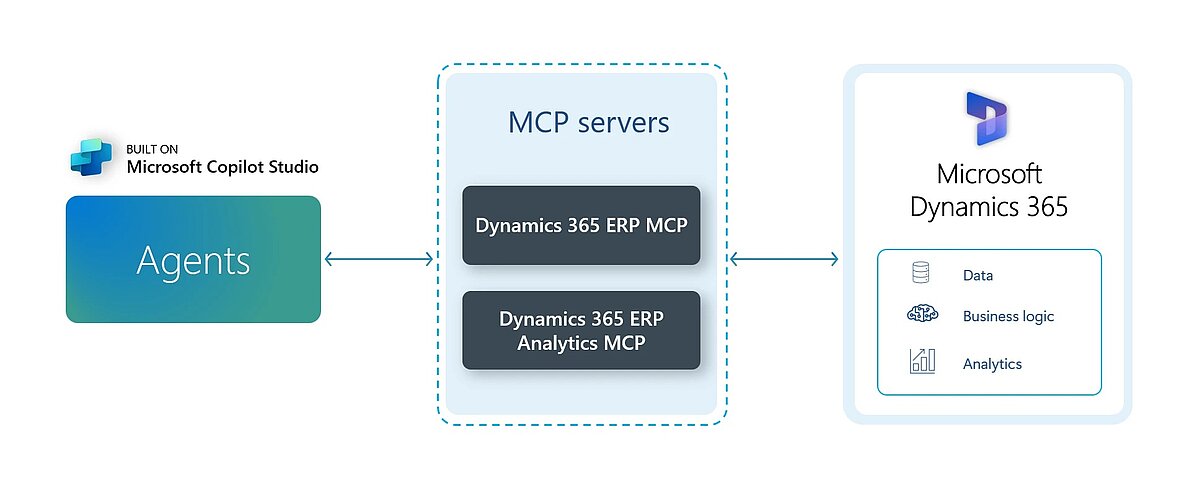
The new MCP server tools let agents interact with ERP forms much like a human user would—opening forms, setting field values, and triggering actions. Instead of relying on static tools for specific tasks (like Find blocked items), agents now use dynamic tools that work across thousands of forms.
MCP now unlocks extensive ERP functionality across Finance, Supply Chain, HR, and Project Operations. These capabilities maintain ERP’s established security, permission, and auditing frameworks, allowing IT teams to expand and innovate confidently.
With every tool interaction, the MCP server dynamically adjusts context based on the agent’s security rights, system settings, and personalization. ISV add-ons and custom environment changes are seamlessly integrated into the MCP ecosystem.
Possibilities and Examples
- Chaining Processes: “Show me all invoices over €10,000 and email me the invoice numbers and customer details.”
- Faster Data Retrieval: “Provide me with the latest invoice for order ‘VK12345’.”
- Quicker Data Creation: “Create a new order for customer ‘DE-1001’.”
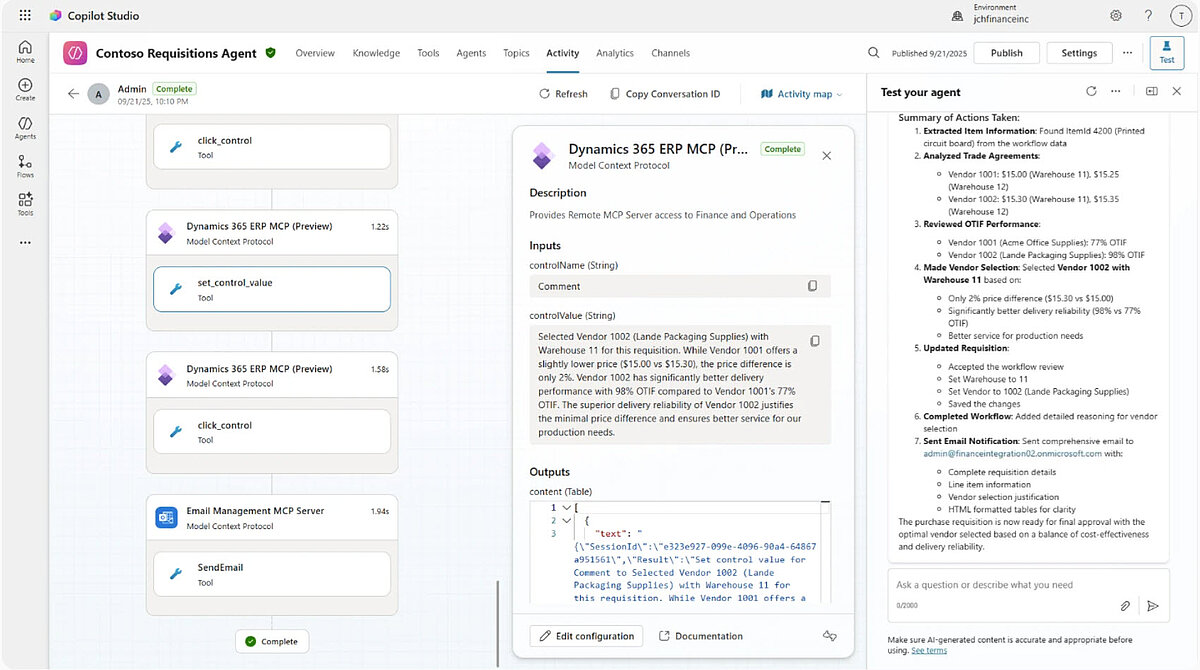
- Simplifying Data Comparison: “Compare offer prices in requisitions from the vendors 1001 and 1002, include delivery and warehouses information”
Prerequisites
- Microsoft Dynamics 365 Supply Chain Management version 10.0.46 or later.
- A Tier 2 or higher environment, or a Unified Developer Environment, is required. MCP Server does not support Cloud Hosted Environments (CHE).
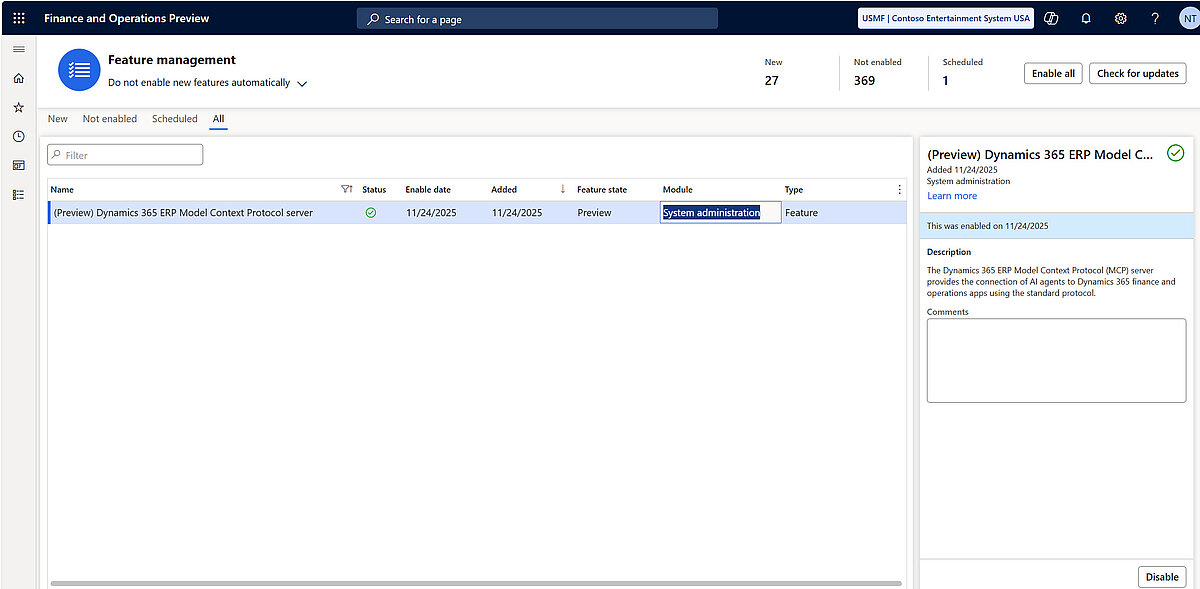
- The feature named (Preview) Dynamics 365 ERP Model context Protocol server must be turned on in Feature management.